
JPEG, PNG and WebP compression are not the same problem
The right compression strategy depends on the image format and the property that must be preserved. JPEG usually trades some visual fidelity for smaller files, PNG can often be optimized losslessly, and WebP can contain either lossy or lossless image data depending on the source and encoder.
Last technical review: 2026-09-19
Key takeaways
- A smaller image is not automatically equivalent to the original image.
- Pixel dimensions, alpha transparency, file format and metadata are separate properties that need explicit decisions.
- Re-encoding often removes original metadata even when width and height are preserved.
- A verified compressor should decode or inspect its own output before offering it.
JPEG: bounded lossy recompression
JPEG is designed for photographic imagery and commonly uses lossy compression. Re-encoding at a lower quality setting can save bytes while keeping the same pixel dimensions, but some image information is discarded.
Repeated JPEG recompression can accumulate artifacts, so a compressor should use a bounded quality strategy and stop rather than degrade indefinitely.
PNG: lossless pixels with structural choices
PNG supports lossless image data and alpha transparency. A lossless optimizer can repack image scanlines or choose more efficient filters without changing the decoded pixel values.
Not every PNG variant is equally simple to process safely. Palette images, interlacing, high bit depths, animation-related structures and uncommon chunks can require separate handling.
WebP: format support and encoder behavior matter
WebP supports multiple coding modes, including transparency. Browser-native encoding behavior can differ from source metadata and does not imply that every possible WebP feature is preserved.
A focused compressor therefore needs to define supported input variants, preserve required dimensions and alpha behavior, and confirm that the output is actually WebP.
How ZAMAZY separates the tools
ZAMAZY uses separate JPEG, PNG and WebP compressors rather than presenting one generic image-compression button. Each tool has its own support rules and verification checks.
The JPEG tool explicitly accepts lossy recompression, the PNG path focuses on lossless pixel preservation, and WebP output is verified as WebP with the expected dimensions and transparency behavior within the supported subset.
Example and decision guide
A photograph, a screenshot with small text and a transparent logo have different priorities. JPEG can suit photographs when some loss is acceptable; lossless PNG is useful when exact decoded pixels and alpha matter. WebP supports several modes, but the ZAMAZY WebP compressor uses a bounded lossy re-encoding workflow, not every mode the format permits.
Choose the compressor for the existing file format. These focused tools are not format converters or resizing tools. Compare text edges, gradients, color and transparent boundaries in the result. Unchanged width and height do not establish unchanged RGB pixels. A quality value is an encoder setting, not a universal visual score or a portable percentage across browsers.
When this approach does not fit
Preserving alpha does not prove preservation of color profiles, animation or every metadata field. An already well-compressed input may yield no acceptable smaller result. When exact pixels, animation, a print color workflow or a specific new format is required, do not substitute a lossy compressor merely because the extension is supported.
Editorial illustration, not a benchmark. Addition reviewed on:
Sources and evidence boundaries
These sources explain formats and methods. They do not certify ZAMAZY; its supported facts and limits are stated on each tool page.
- MDN: Image file type and format guide — Format tradeoffs; format capabilities do not imply tool support.
- W3C: PNG Specification, Third Edition — PNG pixels, alpha and chunks; not a claim that every PNG variant is accepted.
- Google: WebP Container Specification — WebP modes, alpha, animation and metadata containers.
- MDN: HTMLCanvasElement.toBlob() — Encoding format and quality parameters; no certified metadata-removal claim.
First-party manufacturer study: lossless PNG preservation
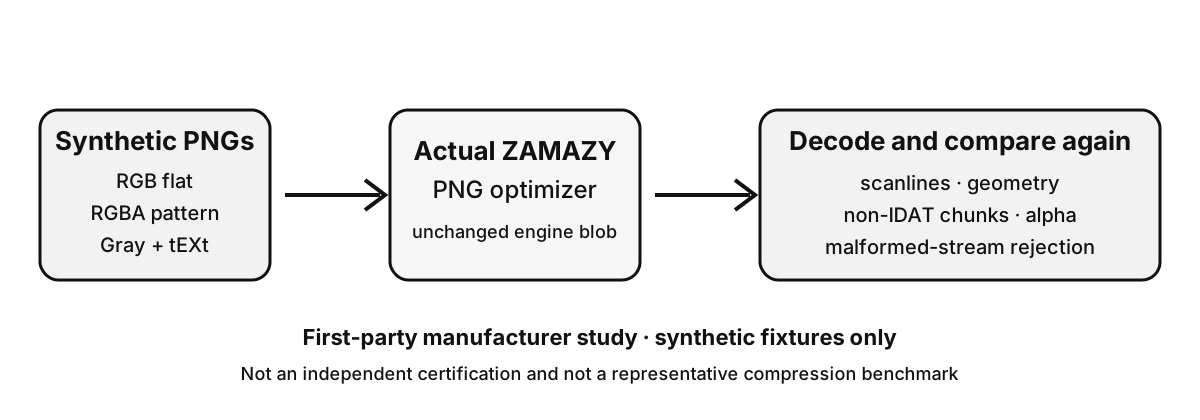
Status: verified. ZAMAZY processed three fixed, fully synthetic PNG files with the unchanged PNG engine, then decoded and structurally compared each result again.
This is a first-party manufacturer study, not an independent certification. The deliberately easy-to-compress inputs were created with zlib compression level 0, so they are not a representative compression benchmark.
| Fixture | Dimensions | Input | Output | Verified preservation |
|---|---|---|---|---|
rgb-flat-v1 | 256 × 64 | 49,284 B | 252 B | Scanlines identical; non-IDAT chunks identical; second pass rejected when no smaller output was produced |
rgba-pattern-v1 | 64 × 32 | 8,292 B | 4,700 B | Scanlines identical; non-IDAT chunks identical; alpha identical; second pass rejected when no smaller output was produced |
gray-metadata-v1 | 64 × 32 | 2,199 B | 158 B | Scanlines identical; non-IDAT chunks identical; second pass rejected when no smaller output was produced |
Negative cases
In the verified environment, truncated zlib data, an invalid Adler-32 checksum, and trailing data after the zlib stream were each rejected.
truncated-zlib: rejectedinvalid-adler32: rejectedtrailing-zlib-data: rejected
Method and limits
The study compared decoded scanlines, geometry, and every non-IDAT chunk before and after optimization; alpha was explicitly checked for the RGBA case. The separate control decompression used Node zlib and is not an independent external verifier.
The evidence applies only to the documented fixtures and engine version. It does not prove every PNG variant, browser network behavior, device support, typical compression ratios, or safety for arbitrary user files.
Study png-preservation-v1 · reviewed · Node 22.22.3 / zlib 1.3.1-e00f703 / linux x64 ·engine commit a12415a3a19f
Frequently asked questions
Is PNG always larger than JPEG?
No. It depends on the image. Photographs often compress better as JPEG, while flat graphics, text-like images and transparency can favor PNG. The formats optimize different kinds of data.
Does keeping the same dimensions mean the image is lossless?
No. Width and height can remain identical while JPEG or lossy WebP discards visual information during encoding.
Why can metadata disappear after image compression?
Browser re-encoding often creates a new image stream rather than copying the original container metadata. EXIF, GPS and other metadata therefore need explicit preservation support if they must survive.